

Note
Go to the end to download the full example code.
NCL_h_lat_6.py#
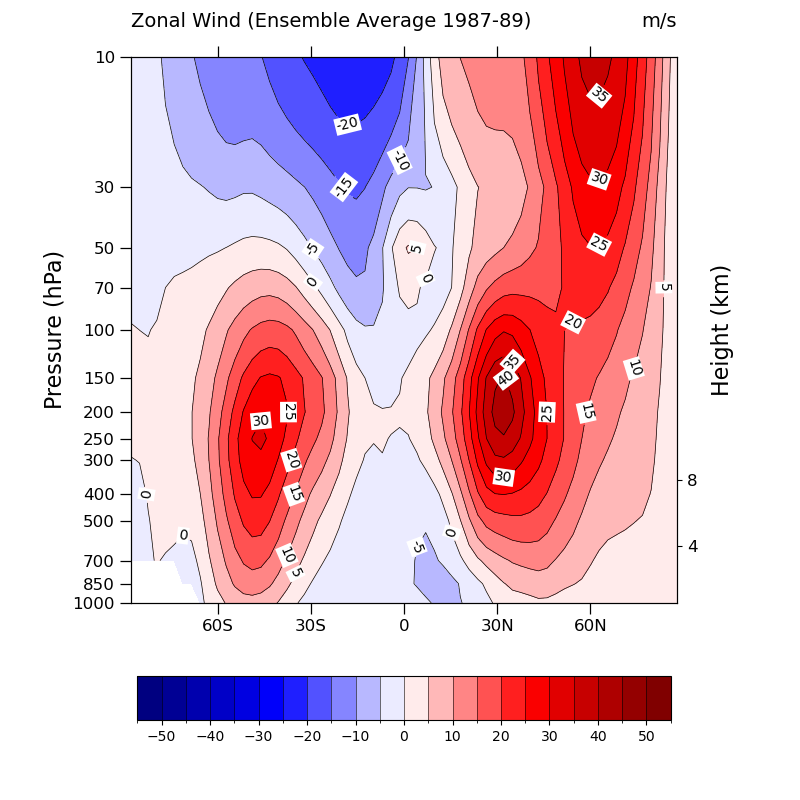
- This script illustrates the following concepts:
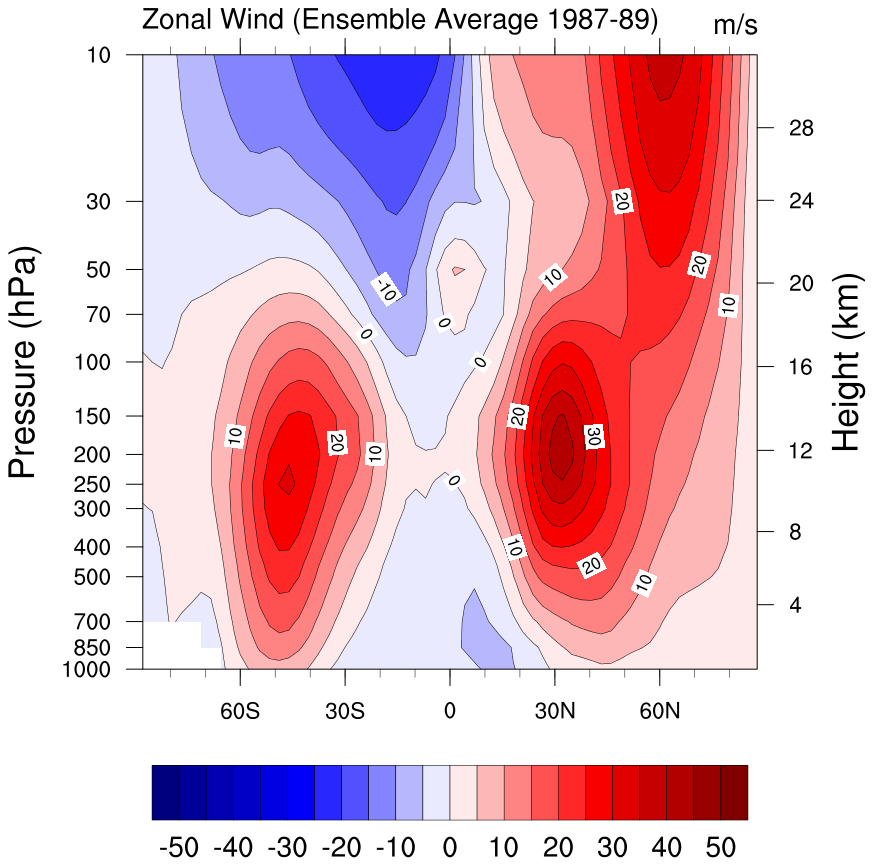
Drawing filled contours of zonal wind
Changing the background color for contour labels
Drawing pressure and height scales
Using a Blue-White-Red colormap
- See following URLs to see the reproduced NCL plot & script:
Original NCL script: https://www.ncl.ucar.edu/Applications/Scripts/h_lat_6.ncl
Original NCL plot: https://www.ncl.ucar.edu/Applications/Images/h_lat_6_lg.png
Import packages:
import numpy as np
import xarray as xr
import matplotlib.pyplot as plt
from matplotlib.ticker import ScalarFormatter
import cmaps


import geocat.datafiles as gdf
import geocat.viz as gv
Read in data:
# Open a netCDF data file using xarray default engine and load the data into xarrays
ds = xr.open_dataset(gdf.get("netcdf_files/mxclim.nc"))
# Extract variables
U = ds.U[0, :, :]
Plot:
# Generate figure (set its size (width, height) in inches) and axes
plt.figure(figsize=(8, 8))
ax = plt.axes()

# Set y-axis to have log-scale
plt.yscale('log')

# Specify which contours should be drawn
levels = np.linspace(-55, 55, 23)

# Plot contour lines
lines = U.plot.contour(
    ax=ax,
    levels=levels,
    colors='black',
    linewidths=0.5,
    linestyles='solid',
    add_labels=False,
)

# Draw contour labels and set their backgrounds to be white
ax.clabel(lines, fmt='%d', levels=levels)
[
    txt.set_bbox(dict(facecolor='white', edgecolor='none', pad=1))
    for txt in lines.labelTexts
]

# Plot filled contours
colors = U.plot.contourf(
    ax=ax, levels=levels, cmap=cmaps.BlWhRe, add_labels=False, add_colorbar=False
)
# Add colorbar
plt.colorbar(
    colors,
    ax=ax,
    orientation='horizontal',
    ticks=levels[1::2],
    drawedges=True,
    aspect=12,
    shrink=0.7,
    pad=0.1,
)

# Use geocat.viz.util convenience function to set axes tick values
# Set y-lim inorder for y-axis to have descending values
gv.set_axes_limits_and_ticks(
    ax,
    xticks=np.linspace(-60, 60, 5),
    xticklabels=['60S', '30S', '0', '30N', '60N'],
    ylim=ax.get_ylim()[::-1],
    yticks=U["lev"],
)

# Change formatter or else tick values will be in exponential form
ax.yaxis.set_major_formatter(ScalarFormatter())

# Use geocat.viz.util convenience function to add major tick lines with no
# minor ticks on lefthand side y axis and some minor ticks on the x axis
gv.add_major_minor_ticks(ax=ax, x_minor_per_major=3, y_minor_per_major=1, labelsize=12)

# Use geocat.viz.util convenience function to add titles and the pressure label
gv.set_titles_and_labels(
    ax,
    lefttitle=U.long_name,
    lefttitlefontsize=14,
    righttitle=U.units,
    righttitlefontsize=14,
    ylabel=U.lev.long_name + " (" + U.lev.units + ")",
    labelfontsize=16,
)

# Create second y-axis to show geo-potential height.
axRHS = gv.add_height_from_pressure_axis(ax, heights=[4, 8])

# Force the plot to be square by setting the aspect ratio to 1
ax.set_box_aspect(1)
axRHS.set_box_aspect(1)

plt.tight_layout()
plt.show()
Total running time of the script: (0 minutes 0.220 seconds)