

Note
Go to the end to download the full example code.
NCL_h_lat_7.py#
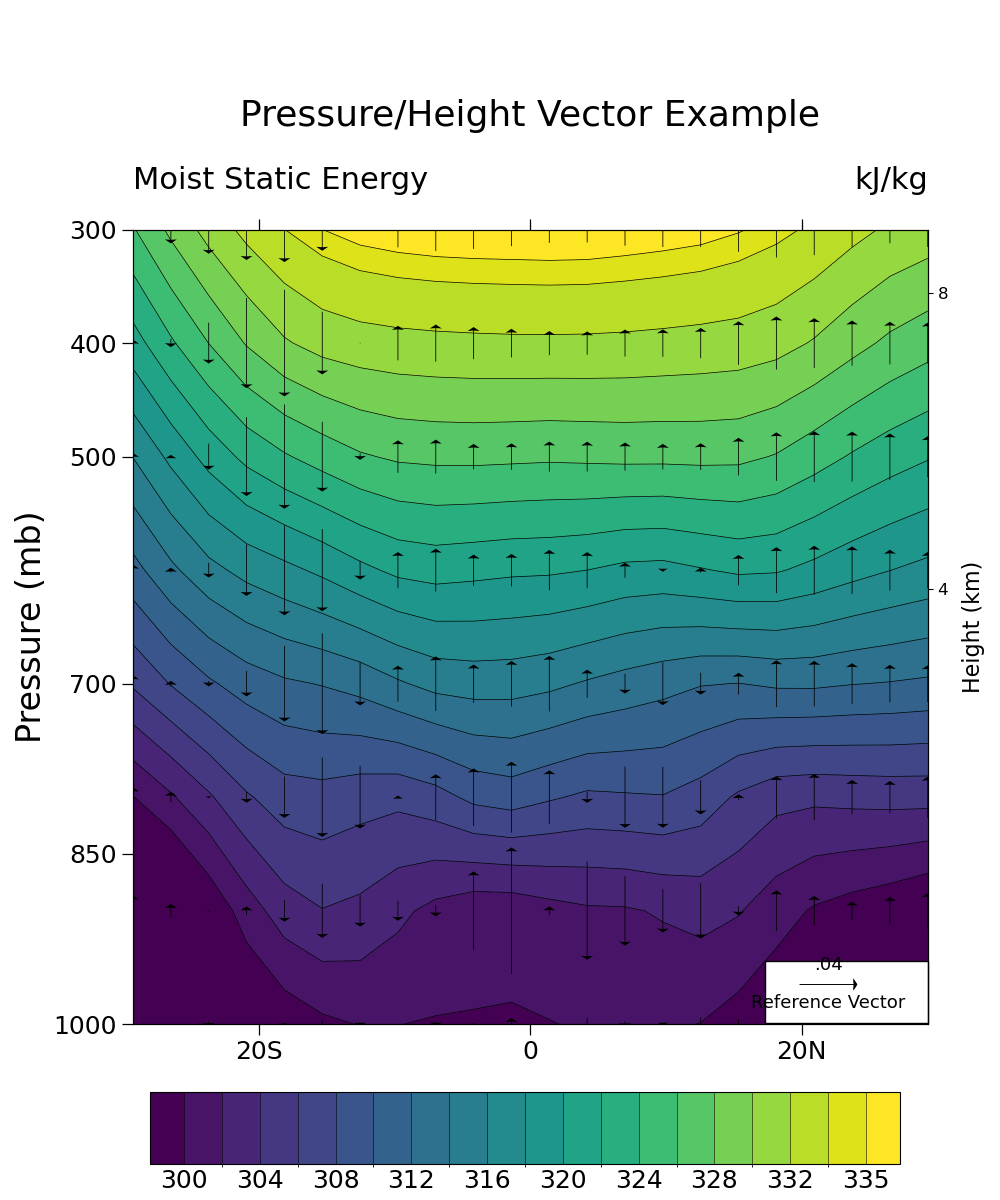
- This script illustrates the following concepts:
Drawing vectors over filled contours
Drawing pressure and height scales
Interpolate to user specified pressure levels
Using the geocat-comp method interp_hybrid_to_pressure
Using a different color scheme to follow best practices for visualizations
- See following URLs to see the reproduced NCL plot & script:
Original NCL script: https://www.ncl.ucar.edu/Applications/Scripts/h_lat_7.ncl
Original NCL plot: https://www.ncl.ucar.edu/Applications/Images/h_lat_7_lg.png
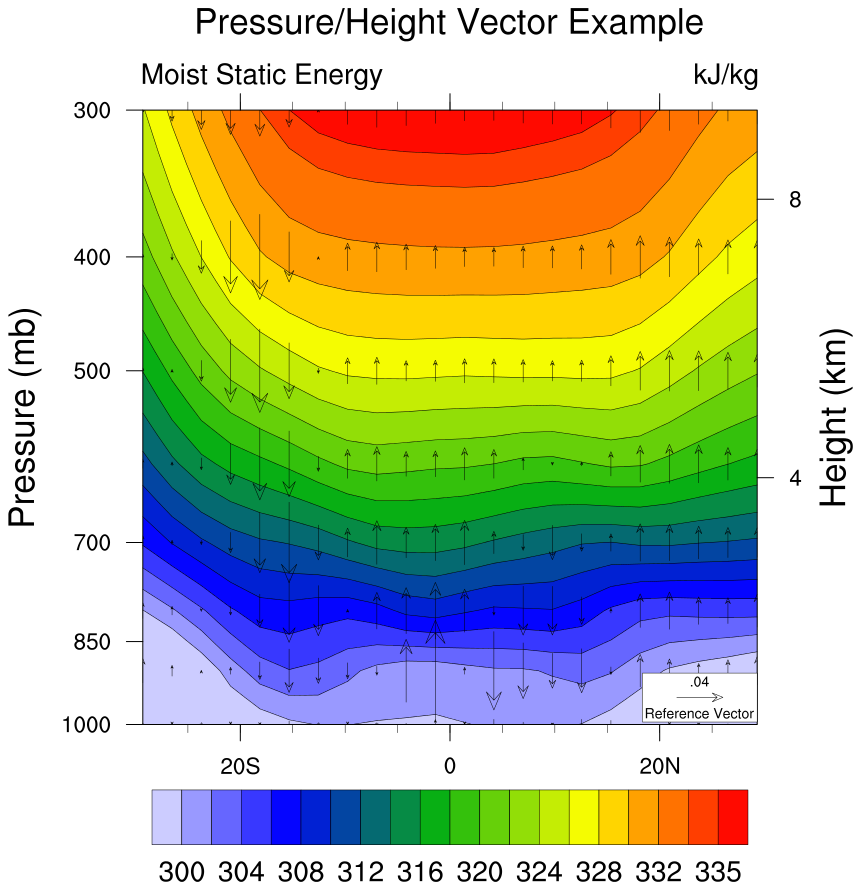
Import packages:
import xarray as xr
from matplotlib import pyplot as plt
import numpy as np

import geocat.datafiles as gdf
import geocat.viz as gv
from geocat.comp import interp_hybrid_to_pressure
Read in data:
# Open a netCDF data file using xarray default engine and load the data into xarrays
ds = xr.open_dataset(gdf.get("netcdf_files/atmos.nc"), decode_times=False)

# Extract variables
T = ds.T  # temperature (K)
V = ds.V  # meridional wind (m/s)
Z = ds.Z3  # geopotential height (m)
omega = ds.OMEGA  # vertical pressure velocity (mb/day)
lev = ds.lev  # pressure levels (millibars)
lev = 100 * lev  # change units to Pa
q = ds.Q  # specific humidity (g/kg)
q = q / 1000  # change units to kg/kg

# Calculate moist static energy (h)
g = 9.81
L = 2.5e6
Cp = 1004.0

h = Cp * T + g * Z + L * q
h = h / 1000  # Convert to kJ/kg

# Convert h and omega to pressure levels
hyam = ds.hyam
hybm = ds.hybm
P0mb = ds.P0 * 0.01
ps = ds.PS
ps = ps / 100  # Convert from pascal to millibar
lev_p = np.array([300, 400, 500, 600, 700, 800, 900, 1000])

# interp_hybrid_to_pressure is the Python version of vinth2p in NCL script
hp = interp_hybrid_to_pressure(
    data=h, ps=ps, hyam=hyam, hybm=hybm, p0=P0mb, new_levels=lev_p, method='log'
)
# Assign attribute values
hp.attrs['units'] = "kJ/kg"
hp.attrs['long_name'] = "Moist Static Energy"

op = interp_hybrid_to_pressure(
    data=omega, ps=ps, hyam=hyam, hybm=hybm, p0=P0mb, new_levels=lev_p, method='log'
)
vp = interp_hybrid_to_pressure(
    data=V, ps=ps, hyam=hyam, hybm=hybm, p0=P0mb, new_levels=lev_p, method='log'
)

# Extract slices of the data
hp = hp.isel(time=0).sel(lat=slice(-30, 30)).sel(lon=210, method='nearest')
op = op.isel(time=0).sel(lat=slice(-30, 30)).sel(lon=210, method='nearest')
vp = vp.isel(time=0).sel(lat=slice(-30, 30)).sel(lon=210, method='nearest')

# Set vp equal to zero so that we plot only the vertical component
# while retaining the coordinate information
vp = xr.zeros_like(vp)
Plot:
# Generate figure (set its size (width, height) in inches)
fig = plt.figure(figsize=(10, 12))

# Generate axes
ax = plt.axes()

# Specify which contours should be drawn
levels = np.arange(300, 335, 2)
levels = np.append(levels, 335)

# Plot contour lines
hp.plot.contour(
    ax=ax,
    colors='black',
    levels=levels,
    linewidths=0.5,
    linestyles='solid',
    add_labels=False,
)

# Plot filled contours
colors = hp.plot.contourf(
    ax=ax, levels=levels, cmap='viridis', add_labels=False, add_colorbar=False
)

# Draw vector plot
# (there is no matplotlib equivalent to "CurlyVector" yet)
Q = ax.quiver(
    hp['lat'],  # horizontal location
    hp['plev'],  # vertical location
    vp,  # horizontal component of the vectors
    op,  # vertical component of the vectors
    color='black',
    pivot="middle",
    width=0.001,
    headwidth=15,
    zorder=1,
)

# Draw legend for vector plot
ax.add_patch(
    plt.Rectangle(
        (17.3, 944),  # location of the SW corner of box in the same units as the data
        12,  # the width of the box in the same units as the x axis
        55,  # the height of the box in the same units as the y axis
        facecolor='white',
        edgecolor='black',
        clip_on=False,
    )
)
# Call quiver key twice to draw the text above and below the key arrow
qk = ax.quiverkey(
    Q,
    0.828,  # x coordinate of the center of the arrow as a percent of the plot width
    0.18,  # y coordinate of the center of the arrow as a percent of the plot height
    0.04,  # the size of the arrow in the same units as the data
    'Reference Vector',
    labelpos='S',
    coordinates='figure',
    color='black',
    fontproperties={'size': 13},
)
qk = ax.quiverkey(
    Q,
    0.828,  # x coordinate of the center of the arrow as a percent of the plot width
    0.18,  # y coordinate of the center of the arrow as a percent of the plot height
    0.04,  # the size of the arrow in the same units as the data
    '.04',
    labelpos='N',
    coordinates='figure',
    color='black',
    fontproperties={'size': 13},
)

# Use geocat.viz.util convenience function to add minor and major tick lines
gv.add_major_minor_ticks(ax, x_minor_per_major=4, y_minor_per_major=1, labelsize=18)

# Use geocat.viz.util convenience function to set axes tick values
gv.set_axes_limits_and_ticks(
    ax,
    ylim=ax.get_ylim()[::-1],
    xticks=np.array([-20, 0, 20]),
    yticks=np.array([300, 400, 500, 700, 850, 1000]),
    xticklabels=['20S', '0', '20N'],
)

# Use geocat.viz.util convenience function to add titles and the pressure label
gv.set_titles_and_labels(
    ax,
    maintitle="Pressure/Height Vector Example",
    maintitlefontsize=24,
    lefttitle=hp.long_name,
    lefttitlefontsize=22,
    righttitle=hp.units,
    righttitlefontsize=22,
    ylabel='Pressure (mb)',
    labelfontsize=24,
)

# Create second y-axis to show geo-potential height.
axRHS = gv.add_height_from_pressure_axis(ax, heights=np.arange(4, 28, 4))

# Force the plot to be square by setting the aspect ratio to 1
ax.set_box_aspect(1)
axRHS.set_box_aspect(1)

# Turn off minor ticks on Y axis on the left hand side
ax.tick_params(axis='y', which='minor', left=False, right=False)

# Add a color bar after calling tight_layout function to prevent user warnings
plt.tight_layout()

cax = plt.axes((0.15, 0.03, 0.75, 0.06))
cab = fig.colorbar(
    colors,
    ax=ax,
    cax=cax,
    orientation='horizontal',
    ticks=levels[::2],
    extendrect=True,
    drawedges=True,
    spacing='uniform',
)

# Set colorbar ticklabel font size
cab.ax.xaxis.set_tick_params(length=0, labelsize=18)

# Show plot
plt.show()
Total running time of the script: (0 minutes 0.361 seconds)